Screenshots

Real output from proc-trace-exec. Colors rendered as-is from the terminal.

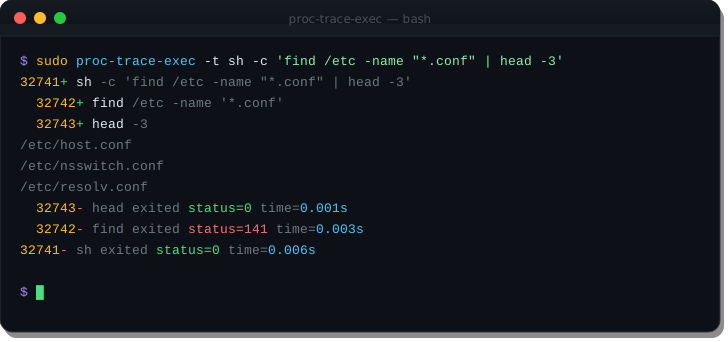
Tracing a command and all its children

Pass a command after the flags to trace only its subtree. The -t flag adds exit status and wall-clock timing to each process โ€” making it easy to spot which subprocess is slow or failing.

$ sudo proc-trace-exec -t sh -c 'find /etc -name "*.conf" | head -3'
CMD mode with timing

Watching the whole system with user context

Run without a command to trace all exec()s on the machine. The -u flag shows the owning user for each process. Root processes appear in red, normal users in green, service accounts in amber โ€” matching the terminal color output.

$ sudo proc-trace-exec -u -t
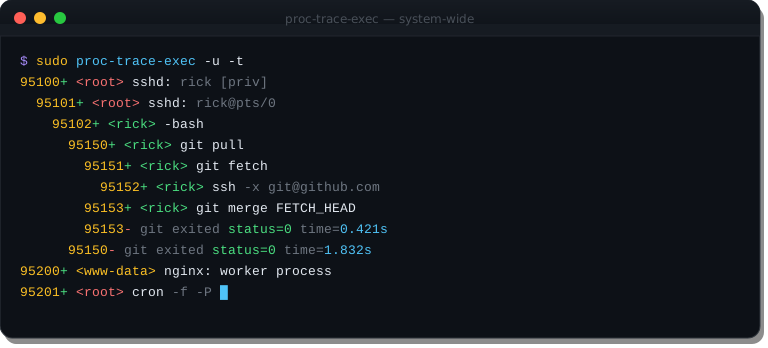
System-wide mode with user annotation

Tracing a C build โ€” see every compiler invocation

Watch exactly what your build system does. See parallelism, identify missing dependencies, or find which step takes longest.

$ sudo proc-trace-exec -t -u make -j4
proc-trace-exec โ€” build trace
91100+ <root> make -j4
  91101+ <root> cc -O2 -c src/conn.c -o build/conn.o
  91102+ <root> cc -O2 -c src/netlink.c -o build/netlink.o
  91103+ <root> cc -O2 -c src/depth.c -o build/depth.o
  91104+ <root> cc -O2 -c src/output.c -o build/output.o
  91104- <root> cc exited status=0 time=0.091s
  91103- <root> cc exited status=0 time=0.102s
  91101- <root> cc exited status=0 time=0.118s
  91102- <root> cc exited status=0 time=0.134s
  91105+ <root> ld -o proc-trace-exec build/*.o
  91105- <root> ld exited status=0 time=0.031s
91100- <root> make exited status=0 time=0.298s

Auditing what an installer actually does

Use -d to add working directories. Watch a package install reveal its full exec tree, including helper scripts, post-install hooks, and any surprise network calls.

$ sudo proc-trace-exec -u -d -t bash install.sh
proc-trace-exec โ€” install audit
62001+ <root> /tmp/install % bash install.sh
  62002+ <root> /tmp/install % id
  62002- id exited status=0 time=0.001s
  62003+ <root> /tmp/install % curl -fsSL https://releases.example.com/v2.1/binary
  62004+ <root> /tmp/install % install -m 755 binary /usr/local/bin/
  62004- install exited status=0 time=0.001s
  62005+ <root> /etc/systemd/system % systemctl enable --now binary.service
  62005- systemctl exited status=0 time=0.043s
  62003- curl exited status=0 time=1.204s
62001- bash exited status=0 time=1.251s
Watching multiple existing processes

Pass comma-separated PIDs to -p to watch several processes simultaneously โ€” useful for monitoring a cluster of nginx workers, a pool of PHP-FPM processes, or any group of related daemons.

$ sudo proc-trace-exec -p $(pgrep nginx | paste -sd,) -t -u
proc-trace-exec โ€” nginx worker monitoring
73400+ <www-data> sh -c '/usr/lib/nginx/modules/load.sh'
  73401+ <www-data> /usr/lib/nginx/modules/load.sh
  73401- load.sh exited status=0 time=0.003s
73400- sh exited status=0 time=0.004s
73410+ <www-data> sh -c 'lua /etc/nginx/scripts/auth.lua'
  73411+ <www-data> lua /etc/nginx/scripts/auth.lua
  73411- lua exited status=0 time=0.011s
73410- sh exited status=0 time=0.012s